




Mobile slot games: 4000+
Available Applications
 Mobile
 Android
 iOS
iOS
If you are looking for a high-volume session on the move, the OnlySpins mobile casino is essentially a browser-based powerhouse. It doesn’t rely on the usual restrictive app store infrastructure, which allows it to pack in the full library of games without the “lite” feel of many competitors. However, the lack of a native app is a double-edged sword; you get instant access and zero storage bloat, but you are also entirely at the mercy of your browser’s stability and your internet speed. For an offshore site, the UI is surprisingly modern, but it demands a lot from your hardware to keep those high-res assets from stuttering.
Android & iOS Compatibility
| OS | Web Browser App | App Download | Mobile Bonus | Live Dealer | Live Chat |
|---|---|---|---|---|---|
| Android | Yes | No | €500/200FS | Yes | Yes |
| iOS | Yes | No | Yes | Yes |
 Slide aside for full view
OnlySpins has skipped the traditional Android and iOS app download route in favor of a universal HTML5 web-app. This means as long as you have a modern browser like Chrome or Safari, the compatibility is nearly 100% across all devices.
On iOS, the site leverages Safari’s engine to manage complex live dealer streams. It scales well on both the latest iPhones and older iPads, though the dense lobby can feel a bit cluttered on smaller screens.
On Android, the experience is similar; the site detects your device and adjusts the layout to be more thumb-friendly. The main trade-off here is performance, because there is no local caching through a native app, every game icon and banner has to load from the server every time. On a flagging 4G connection, this can lead to “blank tile” syndrome where you’re scrolling through empty spaces waiting for the graphics to catch up.
Android App Download Guide
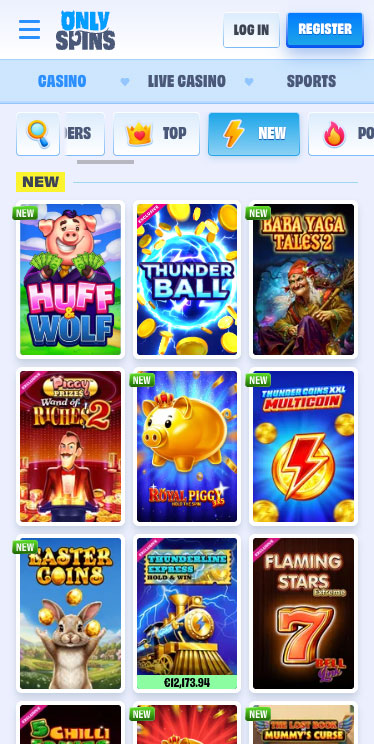
OnlySpins Casino on Android
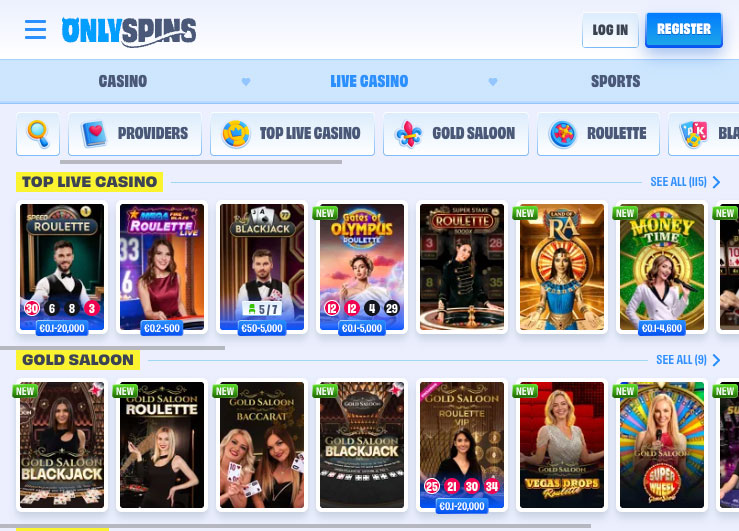
While there is no APK file to download, you can still create a pseudo-app on your Android device to get one-tap access:
- Open Chrome and navigate to the OnlySpins homepage.
- Tap the three dots in the top-right corner to open the browser menu.
- Select “Add to Home Screen.”
Confirm the name, and an OnlySpins icon will appear alongside your other apps.
This shortcut launches the site in “fullscreen mode,” removing the browser address bar. It gives you the “app feel” without the risk of downloading unverified files from outside the Play Store.
iPhone App & iPad App Download

OnlySpins Casino on iPhone
For iPhone and iPad users, the process is equally straightforward. Since Apple is notoriously strict with gambling apps, this browser shortcut is the most reliable way to play:
- Launch Safari and head to the OnlySpins site.
- Tap the “Share” button (the square with an arrow) at the bottom.
- Scroll down and tap “Add to Home Screen.”
- Tap “Add” in the top corner.
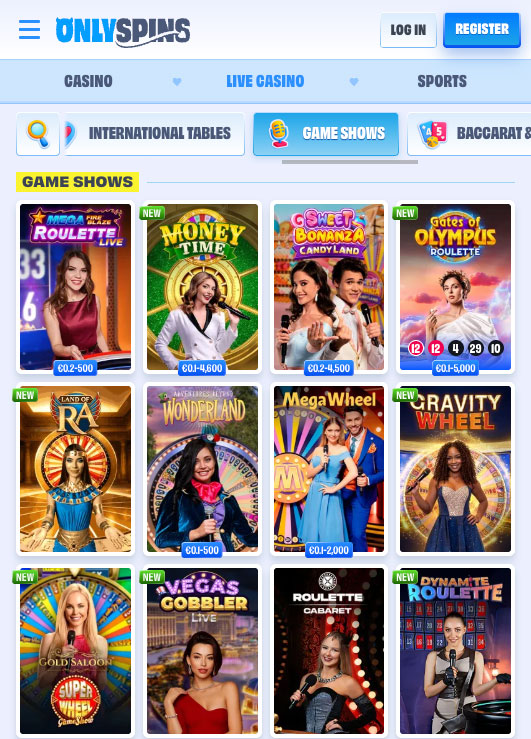
OnlySpins Casino on iPad
This places the OnlySpins mobile casino right on your springboard. It’s a clean workaround that keeps your storage free while making sure the casino is always ready for a quick session.
FAQ
No, there is no native app in the stores. The casino uses a mobile-optimized website that you can save to your home screen. This avoids frequent updates and storage issues but means you need a stable browser to play.
Yes, OnlySpins uses standard SSL encryption for all transactions. However, as with any offshore platform, I’d recommend using a dedicated e-wallet or crypto like USDT for an extra layer of privacy when playing on mobile.
Yes, the full Evolution and Pragmatic Play Live suites are available. Just be aware that these streams are data-heavy. If you aren't on unlimited data, a long session of Lightning Roulette could eat through your monthly allowance quickly.
If you see lag, it’s usually because your browser is struggling to cache the site’s high-res assets. Try closing other open tabs or clearing your browser cache. If you're on a slow connection, the live dealer games will be the first to suffer.
The live chat bubble stays pinned to the bottom of the screen. It opens in a small overlay, so you don't have to leave the lobby to talk to an agent. Responses are generally quick, though you might get "bot-looped" for a minute before hitting a real person.
5.0/5 (5 гласа)